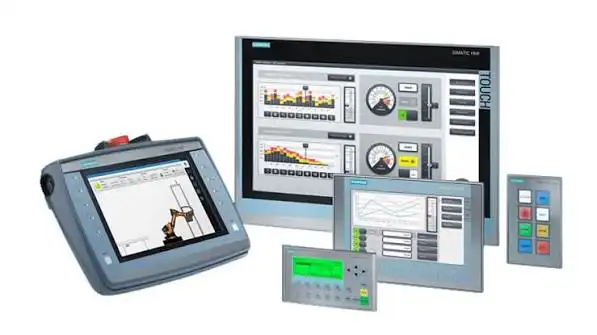
Human Machine Interfaces (HMIs) allow operators to monitor industrial processes, view machine information, and control automated equipment through interactive displays. When an HMI develops a fault, operators may lose access to important production data, machine controls, and system alerts. HMI Troubleshooting UAE helps industrial businesses identify interface problems and restore effective communication between operators and automation systems.
HMI issues can result from damaged touchscreens, power supply interruptions, communication failures, software errors, incorrect configurations, or hardware deterioration. Finding the actual cause of a fault is essential for selecting the right corrective action and maintaining smooth industrial operations.
Common HMI Problems in Industrial Environments
HMIs connect operators with machinery, programmable logic controllers (PLCs), sensors, and other automation devices. Any issue affecting the interface can make it difficult to monitor equipment status or control production activities accurately.
Typical HMI problems include:
Display Failures: Investigating blank screens, flickering displays, poor visibility, or unexpected screen shutdowns.
Touchscreen Malfunctions: Identifying unresponsive touch panels, inaccurate touch detection, and damaged display surfaces.
PLC Communication Errors: Checking network connections, communication protocols, cable conditions, and controller settings.
Software and Configuration Issues: Reviewing application errors, incorrect screen settings, and project configuration problems.
Power Supply Faults: Examining voltage interruptions, loose electrical connections, and unstable power sources.
Alarm and Data Display Problems: Investigating missing notifications, incorrect readings, and unavailable operating information.
A structured HMI Troubleshooting UAE procedure helps technicians determine whether the issue originates from the interface itself, the PLC, the communication network, or another connected component.
HMI Fault Analysis and Technical Inspection
Successful troubleshooting requires a detailed assessment of the HMI’s operating environment, system configuration, and fault history. For example, a frozen screen may indicate a software issue, while missing process values may point to a communication problem between the interface and the controller.
The inspection may include checking the power supply, reviewing error messages, testing communication connections, and examining the interface application. Technicians may also verify whether the HMI is configured with the correct controller address, communication settings, and project version.
For industrial equipment, the diagnosis should follow the manufacturer’s technical documentation and recommended safety procedures. Before changing configurations or replacing hardware, it is important to identify the underlying problem and consider its impact on the connected automation system.
PANATECH assists industrial businesses with evaluating HMI-related faults and identifying practical solutions based on the equipment type, operating conditions, and automation requirements.
HMI Programming and Configuration Support
HMI programming determines how operators interact with machines, view process information, and respond to system alarms. Incorrect screen configurations, communication parameters, application settings, or tag assignments can interfere with normal equipment operation.
Technical support may involve reviewing interface projects, checking PLC communication settings, verifying displayed data, and correcting configuration errors. Where necessary, technicians may assess the existing application and determine whether software adjustments or project restoration are appropriate.
Compatibility is another important consideration when modifying an HMI system. The interface, controller, communication protocol, and application software must work together correctly. Proper configuration helps operators access accurate information and use machine controls more reliably.
PANATECH can help businesses assess these requirements and determine suitable corrective measures for their industrial interface systems.
Preventive Maintenance for HMI Equipment
Routine inspection can help reduce recurring HMI faults and extend the useful life of industrial display equipment. Dust, moisture, excessive heat, vibration, unstable power, and frequent operation may gradually affect interface performance.
Maintenance activities may include inspecting display conditions, checking electrical connections, monitoring operating temperatures, reviewing communication stability, and maintaining suitable equipment backups. Software projects and configuration files should be backed up securely so that recovery options are available if a failure occurs.
Operators should also record recurring alarms and unusual screen behaviour. Repeatedly restarting an interface without investigating the cause may leave the underlying fault unresolved and increase the risk of further disruption.
With planned maintenance and timely technical assessment, businesses can improve system reliability and reduce avoidable interruptions to production activities.
Industrial HMI Support Across the UAE
HMIs are commonly used in manufacturing plants, packaging systems, process control facilities, building automation, and automated production lines. Different applications require different interface configurations, communication methods, and operating conditions.
Effective HMI Troubleshooting UAE involves examining the display hardware, application software, PLC communication, power supply, and relevant system settings. Depending on the findings, corrective work may include repairing connections, adjusting configurations, restoring software, or replacing faulty components.
PANATECH supports industrial businesses by helping identify interface-related problems and assess suitable technical solutions for their automation equipment. A systematic approach to fault diagnosis and maintenance can help reduce downtime, improve operator access to machine information, and support consistent production processes.
When an HMI experiences display problems, touchscreen failures, communication interruptions, or repeated software errors, prompt technical evaluation can help prevent further operational difficulties. Businesses requiring HMI Troubleshooting UAE can contact PANATECH for equipment-focused troubleshooting support and solutions designed around their industrial automation needs.
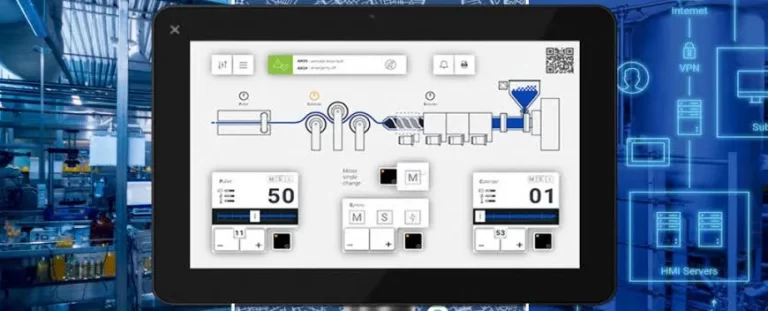
HMI Troubleshooting UAE – Professional Industrial Interface Solutions by PANATECH
Improving Operator Control and Industrial System Performance
Human Machine Interfaces (HMIs) play an important role in industrial automation by allowing operators to monitor processes, access machine information, and manage equipment through interactive displays. A malfunctioning interface can prevent operators from viewing essential data, responding to alarms, or controlling connected machinery effectively. PANATECH helps industrial businesses evaluate interface-related issues and identify suitable HMI Troubleshooting UAE solutions for their automation systems.
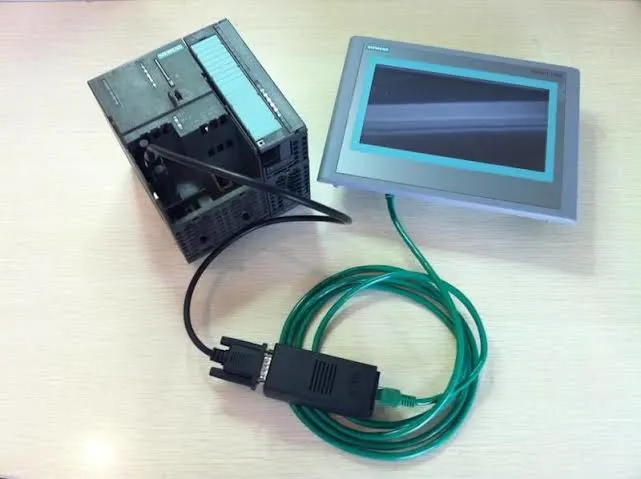
HMI problems may develop because of touchscreen damage, unstable power supplies, software errors, incorrect configuration, network interruptions, or communication failures between the interface and a programmable logic controller (PLC). Identifying the source of the problem is important for restoring normal functionality and minimizing unnecessary production delays.
Understanding Common HMI Malfunctions
Industrial interfaces operate as a connection between machine operators and automated equipment. When the display or its associated control system develops a fault, it can affect visibility, monitoring accuracy, and access to essential machine functions.
Frequently encountered HMI issues include:
Blank or Flickering Screens: Checking power connections, display components, and internal hardware conditions.
Unresponsive Touch Panels: Investigating touchscreen damage, calibration issues, and interface hardware faults.
PLC Communication Errors: Examining network cables, communication protocols, controller settings, and connection status.
Incorrect Displayed Values: Reviewing data tags, PLC addresses, application logic, and communication stability.
Software and Application Failures: Identifying configuration errors, corrupted projects, or compatibility problems.
Alarm Display Issues: Checking alarm configurations, event records, and notification settings.
Recognizing these symptoms helps technicians determine whether the problem is associated with the HMI hardware, application software, communication network, or connected automation equipment.
Diagnostic Methods for Industrial HMI Systems
Troubleshooting begins with examining the equipment model, system configuration, operating environment, and circumstances surrounding the failure. Error messages, intermittent screen problems, and communication warnings can provide useful information about the possible cause.
A technical assessment may involve inspecting the power supply, checking cable connections, reviewing system logs, and verifying communication between the HMI and PLC. Technicians may also examine application settings and confirm whether the interface is using the correct project version and communication parameters.
PANATECH helps businesses assess these technical concerns and identify appropriate corrective measures. Careful diagnosis can reduce unnecessary component replacements and help determine whether the issue requires configuration changes, hardware repair, or further investigation of the connected control system.
HMI Programming, Software, and Communication Configuration
The performance of an industrial interface depends on its programming, data connections, and compatibility with other automation devices. Incorrect tag assignments, communication addresses, screen settings, or software configurations can prevent operators from receiving accurate information.
HMI programming support may include reviewing application screens, checking PLC communication settings, validating displayed process data, and identifying configuration inconsistencies. Where appropriate, technicians may assess whether a project backup can be restored or whether software adjustments are required.
Communication compatibility is particularly important in systems that use different controllers, network arrangements, and industrial protocols. Before modifying an existing application, the equipment specifications and manufacturer’s recommendations should be reviewed to avoid introducing further operational problems.
A properly configured interface helps operators access relevant machine information, monitor production activities, and respond to system notifications more effectively.
HMI Repair and Preventive Maintenance Practices
Industrial HMI equipment can experience gradual deterioration because of heat, dust, moisture, vibration, electrical fluctuations, and continuous operation. Regular inspection helps identify potential issues before they significantly affect production activities.
Maintenance activities may include examining the display and touchscreen, checking power connections, reviewing communication performance, and inspecting the surrounding installation conditions. Keeping secure backups of HMI projects and configuration files can also support recovery if software problems or equipment replacement become necessary.
When an interface repeatedly freezes or loses communication, resetting the device without investigating the cause may not resolve the underlying fault. A detailed assessment helps determine whether the problem is related to hardware deterioration, software settings, or external system conditions.
Any inspection or repair should be carried out by qualified personnel using appropriate safety procedures and equipment-specific guidance.
Industrial HMI Troubleshooting Support Across the UAE
HMIs are used in manufacturing facilities, packaging lines, water treatment systems, building automation, process industries, and other environments that rely on automated controls. Each installation has specific requirements for display functionality, communication, and operator access.
Effective HMI Troubleshooting UAE involves evaluating the interface, connected PLC, communication network, power supply, and application configuration. Depending on the findings, the required action may involve correcting settings, restoring software, repairing connections, or replacing defective hardware.
PANATECH assists industrial businesses in assessing their automation equipment and understanding the available options for addressing interface-related problems. A systematic approach can help reduce avoidable downtime, improve operator visibility, and maintain consistent communication with industrial control systems.
Strengthen Automation Reliability with PANATECH
Reliable HMI performance supports efficient monitoring, accurate process information, and better interaction between operators and machinery. When interface faults remain unresolved, businesses may experience monitoring difficulties, delayed responses, and interruptions to normal operations.
Choosing appropriate HMI Troubleshooting UAE support helps industrial facilities investigate display failures, touchscreen issues, PLC communication errors, and software-related faults. Accurate diagnosis, compatible configurations, and preventive maintenance are important for maintaining dependable interface performance.
For businesses experiencing recurring HMI problems or planning to improve their industrial control systems, PANATECH provides a starting point for evaluating equipment requirements and identifying suitable technical support solutions across the UAE.
Reliable Human Machine Interface Performance in Industrial Automation
Human Machine Interfaces (HMIs) allow operators to interact with industrial equipment, monitor production processes, and access essential operating information. These interfaces connect people with automated control systems, making them important for efficient machine operation. When an HMI malfunctions, operators may experience display problems, lose access to process data, or face difficulties controlling connected equipment. PANATECH helps industrial businesses assess interface-related issues and identify appropriate technical solutions.
Understanding the equipment configuration, operating environment, and symptoms is essential when investigating interface faults. A systematic HMI Troubleshooting UAE approach helps identify possible causes and determine suitable corrective measures for maintaining reliable automation performance.
Recognizing Common HMI Performance Issues
Industrial interfaces may experience faults that affect display quality, touchscreen response, software operation, and communication with connected controllers. Some problems appear as error messages, while others involve missing information or unexpected interruptions during operation.
Common HMI issues include blank screens, unresponsive touch panels, communication errors, incorrect process readings, software failures, and missing alarm notifications. These problems may originate from the interface hardware, power supply, application settings, PLC connections, or network configuration.
Recording error messages and observing when the problem occurs can help technicians understand the symptoms. This information supports a more focused investigation and helps prevent unnecessary changes to the existing automation system.
Technical Assessment and Fault Identification
A detailed inspection begins with reviewing the HMI model, application requirements, connected control equipment, and reported symptoms. The diagnostic process depends on the type of interface, the connected machinery, and the conditions under which the fault develops.
Important inspection areas include:
Display and Touchscreen Testing: Examining screen visibility, touch response, and possible hardware damage.
Power Supply Inspection: Checking the electrical supply and connections for interruptions or irregularities.
PLC Communication Verification: Reviewing communication cables, network status, and controller settings.
Software Configuration Review: Examining application settings, project versions, and possible configuration errors.
Data Accuracy Checks: Investigating incorrect readings, missing values, and communication-related data problems.
Alarm Function Evaluation: Checking whether system notifications and event records operate as expected.
These checks help determine whether the issue requires configuration adjustments, software recovery, hardware inspection, or further investigation of the connected control system.
Improving HMI Configuration and Operator Access
HMI performance depends on appropriate programming, accurate data assignments, and reliable communication with industrial controllers. Incorrect tag addresses, unsuitable communication settings, or incompatible application versions can prevent operators from accessing the correct machine information.
Configuration assessments may involve checking screen layouts, reviewing PLC communication parameters, validating displayed values, and examining alarm settings. When software problems are suspected, available project backups and manufacturer documentation may help guide recovery or correction.
PANATECH helps industrial businesses evaluate their interface requirements and consider suitable technical support options. Proper configuration allows operators to monitor processes more effectively, understand machine conditions, and respond to system notifications with greater confidence.
Preventive Maintenance for Industrial Interface Systems
Routine maintenance can help reduce unexpected HMI failures and support consistent equipment operation. Exposure to dust, moisture, heat, vibration, and electrical disturbances may affect display components and connected electronic equipment over time.
Maintenance activities may include inspecting screens and connections, checking ventilation conditions, reviewing recurring error messages, and monitoring communication stability. Maintaining secure backups of application files and configuration settings can also help businesses prepare for software recovery or equipment replacement.
Recurring faults should be investigated instead of relying only on repeated restarts. Qualified personnel should follow appropriate safety procedures and manufacturer recommendations when inspecting or servicing industrial control equipment.
HMI Support for Different Industrial Applications
HMIs are used in manufacturing facilities, packaging equipment, process control systems, water treatment plants, and automated production lines. Each application has specific requirements for operator interaction, process monitoring, data communication, and system reliability.
Effective HMI Troubleshooting UAE involves considering the interface, PLC, power supply, communication network, and application software together. Depending on the diagnosis, corrective action may include repairing connections, adjusting settings, restoring a project, or replacing defective components.
Providing the equipment model, error messages, and a clear description of the problem can help technical professionals understand the situation and identify suitable next steps.
Strengthening Automation Reliability with PANATECH
HMI faults can affect production monitoring, operator response, and the availability of important machine information. Timely investigation helps businesses identify the source of the problem and select appropriate solutions according to their equipment requirements.
PANATECH supports industrial businesses in evaluating automation interface concerns and determining practical technical measures. A combination of accurate diagnosis, suitable configuration, and regular maintenance can help improve interface reliability and reduce avoidable operational interruptions.
For businesses experiencing touchscreen failures, display errors, communication interruptions, or software-related problems, HMI Troubleshooting UAE provides a focused approach to identifying and addressing interface faults. With suitable technical assessment and equipment-specific support, industrial facilities can work towards reliable operator control and efficient automation performance across the UAE.
How does PANATECH provide HMI Troubleshooting UAE services?
PANATECH helps identify HMI display faults, touchscreen problems, PLC communication errors, and software configuration issues to support reliable industrial automation.
What are the common causes of HMI failures?
Common causes include power supply interruptions, damaged touchscreens, software errors, communication failures, and incorrect configuration settings.
How can I identify an HMI communication problem?
Communication problems may appear as missing process data, connection error messages, or an inability to exchange information with the connected PLC.
Can HMI software configuration errors be corrected?
Yes, configuration errors can often be resolved by checking application settings, communication parameters, data assignments, and compatible project files.
Why is preventive maintenance important for HMI systems?
Preventive maintenance helps identify developing faults, maintain stable operation, and reduce unexpected interruptions in industrial processes.
When should an industrial HMI be repaired or replaced?
Repair or replacement may be necessary when an interface has persistent hardware failures, severe touchscreen damage, recurring faults, or unsupported components.
How can HMI performance be improved in industrial environments?
Regular inspections, secure software backups, correct configuration, stable power, and reliable communication connections can help maintain consistent HMI performance.
Which HMI Issues Can Be Resolved Through Troubleshooting?
HMI Issues | Description |
|---|---|
Display Malfunctions | Identify blank screens, flickering displays, and screen freezing. |
Touchscreen Response Issues | Address unresponsive touch panels and inaccurate touch detection. |
Communication Failures | Investigate connection problems between HMIs, PLCs, and automation equipment. |
Software Errors | Identify application failures, incorrect settings, and configuration issues. |
Power Supply Problems | Examine electrical interruptions and unstable power connections. |
Incorrect Data Display | Check missing values, inaccurate readings, and process information errors. |
Alarm Notification Faults | Investigate missing alarms, error messages, and notification problems. |
I had a good experience with PANATECH for HMI troubleshooting and programming support. Their professional approach to identifying industrial display issues and resolving HMI faults was helpful. I would recommend PANATECH for reliable industrial automation support in the UAE.